Cutout letter assemble
Fly scattered magazine-cut letters into an editable message. Choose a paper palette, arrival motion and backdrop, then hold the finished cutout composition.
Try this effect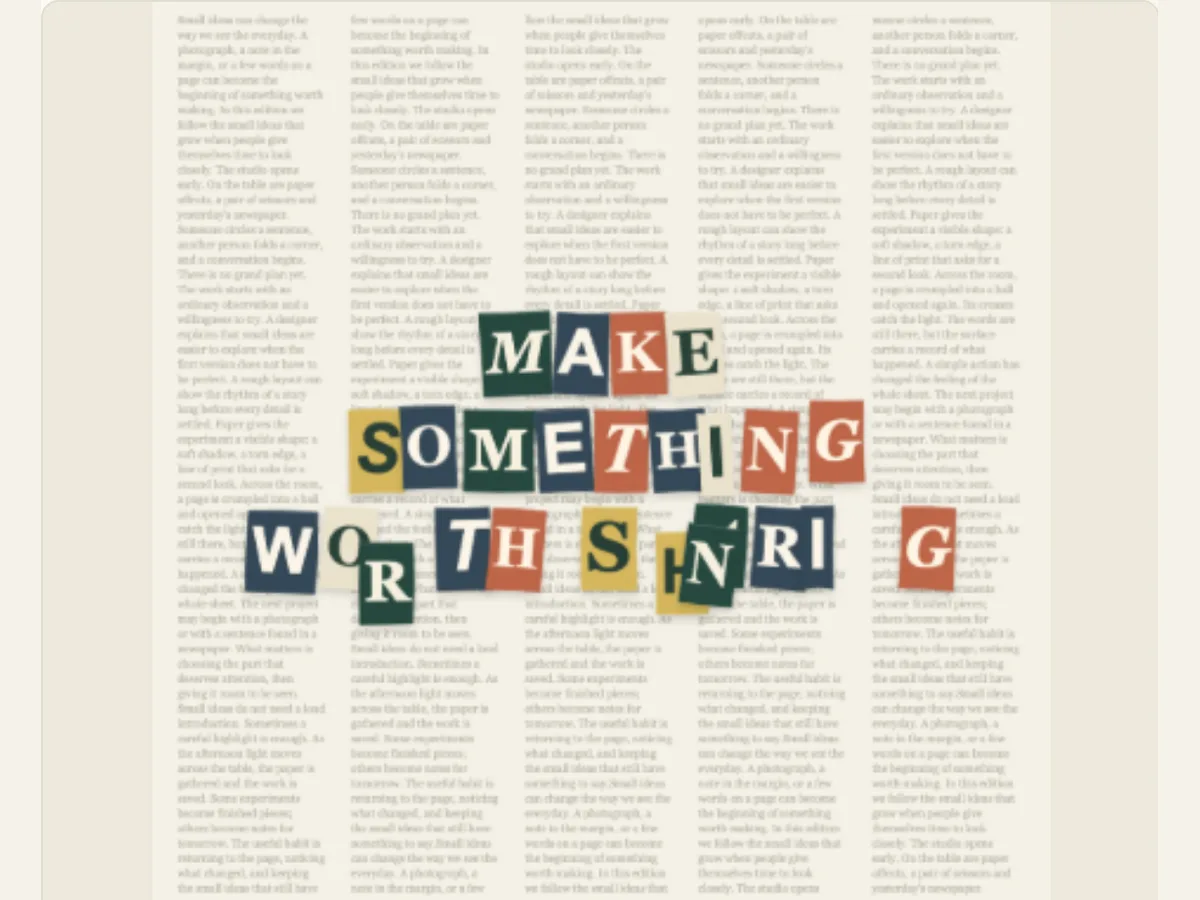
Assemble a message from individual paper letters
Cut out headline letters can create a "hand-assembled" look for a brief message, opposed to having it typed directly onto a completed graphic. Cut Out Letter Assemble allows users to move individual paper letters around to form an editable phrase. Additionally, users can choose from various entry effects, color palettes of paper and background. This technique works well when creating a title for a song, introducing a creator, announcing a hand-made product, creating a chapter card or posting a brief social update requiring tactile typography.
The editor makes an artfully designed collage with letters. It does not scan magazines for content, nor does it keep track of the origins of the letters it uses. The visual effects used by the editor are unique to itself. When you require publishedClippings from publications, you can use images that you have received permission to reproduce and then position those images within a workflow that preserves the source of the clippings. This animation can be viewed as cut-out style lettering and should not be considered to be physical evidence of a ransom-note or a sourced archival collage.
Write a phrase that holds together when letters move
Your Cutout Message has a maximum character limit of eighty characters. It will be easier for people to read as each letter lands, particularly if you are creating a vertical video and your lines are narrow. Try to create a clear headline or callout instead of a long sentence with many different parts. If you find that the copy breaks at an awkward point, you can either reduce the length of the copy or place a deliberate line break. After all of the letters land, the finished phrase should have a natural reading order.
Verify punctuation, capitalization and spelling prior to checking the motion. This animation views the text that you have input as the message. Therefore, an unapplied apostrophe, or inconsistent use of capital letters will become obvious when the individual letters come together. If you are creating a logo, and the letters of the logo need to be identical to a specific registered brand font, then create a separate logo file. Although the cut-out approach is a great way to make headlines creative, it is not always possible to recreate a company's registered word mark with this method.
Scroll sideways to compare every column →
| Control | Available direction | What it changes |
|---|---|---|
| Arrival | Scatter, drop or slide | Sets how letters enter |
| Palette | Editorial, Warm pop or Monochrome | Changes paper and print colors |
Pick an arrival pattern for the energy of the title
Arrival includes three types of entry; Scatter In, Drop In, and Slide In. Scatter In creates an uneven entry into the canvas, Drop In emphasizes that the items come down from above, and Slide In brings the items horizontally into position on the canvas. Choose the pattern that best complements the rest of your video. For example, a slow sliding pattern may work well with a product demonstration video, whereas a scatter pattern may provide a fun feel to a zine or music video. Each of these patterns will be more difficult to understand if the last words are shown on screen for too short of a period.
Shuffle Letter Designs will provide you with a second group of letter designs. You may change the seed to see what other options are available for the same words, color scheme and background; this allows you to evaluate different layouts. Shuffling the letter designs can help create visual variety, but there is no guarantee that your letters will look similar to each other as a whole throughout the entire campaign. Before you start to shuffle the designs again, save the design that you like the best. If you are creating a recurring series, use the same colors and movement for each episode, and determine if the randomly generated letters are still readable in conjunction with the previous episodes.
Use a paper palette and backdrop to set the tone
The options for paper palettes are Editorial, Warm Pop, and Monochrome. The options for backdrops are Newsprint, Plain Paper, and Studio Grid. An editorial palette may imply that you want to create a magazine style page. Warm Pop creates brighter colors on your screen. A monochrome palette produces a softer effect with less contrast. Your backdrop will create a visual contrast to the text in your project. If you find parts of your project disappearing into the backdrop, try using a different palette or selecting another backdrop prior to adding more animation.
The newsprint background can create the feeling that your headline is part of a news article, while plain white paper provides more space. A grid layout in the studio will provide a more visually appealing work area. It's best to avoid using a complex background with tiny font and a long line. You should preview your video on a cell phone or the exact size you plan to embed it, as although there may be great detail when editing, this detail may become unreadable once the video is exported and scaled down.
Examples for a title, event and creator campaign
A musician who is independent may have a track name on a newsprint background prior to showing their live performance. A craft store could display a short announcement of a new product in bright colors. A video essay may show black-and-white letters for a chapter heading and keep the last few words on the screen while the narrator begins discussing the subject matter. The animation provides a way of introducing text to the viewer; however, the remainder of the video may contain the date of the event, information about the product, or credit for individuals involved in making the video.
Keep the message and hierarchy in mind for campaigns with multiple versions so users recognize that these are part of a series. While using fewer characters is beneficial, a title may still appear cluttered if there are too many words. Users should find it easy to comprehend the title on their initial viewing. When testing the last frame of the video without movement, if the text does not create a recognizable sentence/phrase when viewed statically, then modifying how the text arrives at the screen won't fix the layout issue.
Compose the final line before increasing the pace
Enter your message, select a palette and backdrop, and choose how you want the letters to arrive. Shuffle your designs until they look good together. Watch the entire animation and pay attention to the first letters that appear and the last ones to complete your title. Your editor’s global duration and movement settings will help you set the right pace for your animation. If your message is going too fast, slow down the movement or make your message simpler. If your animation feels like it is moving too slowly, remove unnecessary words from your message rather than speeding up the animation.
Leave a hold on the assembly for the viewer to finish reading. If you use a short title, you only need to give the viewer a few seconds to read. However, if your title is long, then you will have to allow the viewer more time. To prevent important letters from being cut off by social interfaces at the top or bottom of the screen, keep important letters away from those areas. When creating a square or portrait cropped image, preview the text as it would appear when published, and check each line individually. After all of the letters have appeared, the text should still be the primary focus of the image.
Add the assembled title to a timeline
For still images, export as PNG. For a smaller, preview-sized version of your project, export as a GIF. For an animated presentation of your project in a browser-ready format, export as a video. When exporting as a video, you have the option of having either a solid colored background or a green screen for chroma key compositing. Videos exported through this method will not include alpha transparency. As with videos, GIFs exported using this method will also have a solid colored background. The Export Dialog will display all available formats based on what is supported by the user’s web browser. Therefore, it is recommended that you select an export format that is compatible with the video editing program that you intend to use.
Once you download, you can open the file in the location where it is saved. At this time, you can also view the text at the highest resolution. Green screen exports will most likely require some slight adjustments to the green screen keys on the edges of the paper, especially if there are green elements in your color scheme. Before making any changes to the phrase for a different campaign, make sure to save the editable project. If you want to create a newspaper style word effect, then you should compare Magazine Letters and use the Magazine Letter Animation guide. Stop-Motion Cutout Collage uses torn paper and images, along with headlines.
Make text and source artwork clear to the audience
When writing about the resulting letters, they may appear like clippings; therefore, describe the effect accurately and avoid stating that a phrase was removed from a specific publication unless it was. If a specific font or logo is needed, utilize approved art work and verify that it can be altered for the planned application. Any required trademarks, credits to artists, or attributions should remain external to the animation when there isn't sufficient space within the design.
The ability to access the content of animated letters is also important. Use the main point in either the caption or in the body of the message, so that those who cannot read the moving parts of the letters will be able to get the message. Avoid any flashing or rapid movements which could make it difficult for viewers to look at the letterhead. A slow, intentional entry; high-contrast legibility; and a long pause after completion of the movement help to create an effective form of communication with the letters, rather than simply as a decorative element.